Showing posts with label Software Engineering. Show all posts

Saturday, February 8, 2020

Software Metrics by 124 Study (Submitted by Ranjot Singh)

Software Metrics 

A software metric is a measure of software characteristics which are quantifiable or countable. Software metrics are important for many reasons, including measuring software performance, planning work items, measuring productivity, and many other uses.
Within the software development process, there are many metrics that are all related to each other. Software metrics are related to the four functions of management: Planning, Organization, Control, or Improvement.
In this article, we are going to discuss several topics including many examples of software metrics:
  • Benefits of Software Metrics
  • How Software Metrics Lack Clarity
  • How to Track Software Metrics
  • Examples of Software Metrics

Benefits of Software Metrics

The goal of tracking and analyzing software metrics is to determine the quality of the current product or process, improve that quality and predict the quality once the software development project is complete. On a more granular level, software development managers are trying to:
  • Increase return on investment (ROI) 
  • Identify areas of improvement
  • Manage workloads
  • Reduce overtime
  • Reduce costs
These goals can be achieved by providing information and clarity throughout the organization about complex software development projects. Metrics are an important component of quality assurance, management, debugging, performance, and estimating costs, and they’re valuable for both developers and development team leaders:
  • Managers can use software metrics to identify, prioritize, track and communicate any issues to foster better team productivity. This enables effective management and allows assessment and prioritization of problems within software development projects. The sooner managers can detect software problems, the easier and less-expensive the troubleshooting process.
  • Software development teams can use software metrics to communicate the status of software development projects, pinpoint and address issues, and monitor, improve on, and better manage their workflow.
Software metrics offer an assessment of the impact of decisions made during software development projects. This helps managers assess and prioritize objectives and performance goals.

How Software Metrics Lack Clarity

Terms used to describe software metrics often have multiple definitions and ways to count or measure characteristics. For example, lines of code (LOC) is a common measure of software development. But there are two ways to count each line of code:
  • One is to count each physical line that ends with a return. But some software developers don’t accept this count because it may include lines of “dead code” or comments.
  • To get around those shortfalls and others, each logical statement could be considered a line of code.
Thus, a single software package could have two very different LOC counts depending on which counting method is used. That makes it difficult to compare software simply by lines of code or any other metric without a standard definition, which is why establishing a measurement method and consistent units of measurement to be used throughout the life of the project is crucial.
There is also an issue with how software metrics are used. If an organization uses productivity metrics that emphasize volume of code and errors, software developers could avoid tackling tricky problems to keep their LOC up and error counts down. Software developers who write a large amount of simple code may have great productivity numbers but not great software development skills. Additionally, software metrics shouldn’t be monitored simply because they’re easy to obtain and display – only metrics that add value to the project and process should be tracked.

How to Track Software Metrics

Software metrics are great for management teams because they offer a quick way to track software development, set goals and measure performance. But oversimplifying software development can distract software developers from goals such as delivering useful software and increasing customer satisfaction.
Of course, none of this matters if the measurements that are used in software metrics are not collected or the data is not analyzed. The first problem is that software development teams may consider it more important to actually do the work than to measure it.
It becomes imperative to make measurement easy to collect or it will not be done. Make the software metrics work for the software development team so that it can work better. Measuring and analyzing doesn’t have to be burdensome or something that gets in the way of creating code. Software metrics should have several important characteristics. They should be:
  • Simple and computable
  • Consistent and unambiguous (objective)
  • Use consistent units of measurement
  • Independent of programming languages
  • Easy to calibrate and adaptable
  • Easy and cost-effective to obtain
  • Able to be validated for accuracy and reliability
  • Relevant to the development of high-quality software products
This is why software development platforms that automatically measure and track metrics are important. But software development teams and management run the risk of having too much data and not enough emphasis on the software metrics that help deliver useful software to customers.
The technical question of how software metrics are collected, calculated and reported are not as important as deciding how to use software metrics. Patrick Kua outlines four guidelines for an appropriate use of software metrics:

1. Link software metrics to goals.

Often sets of software metrics are communicated to software development teams as goals. So the focus becomes:
  • Reducing the lines of codes
  • Reducing the number of bugs reported
  • Increasing the number of software iterations
  • Speeding up the completion of tasks
Focusing on those metrics as targets help software developers reach more important goals such as improving software usefulness and user experience.
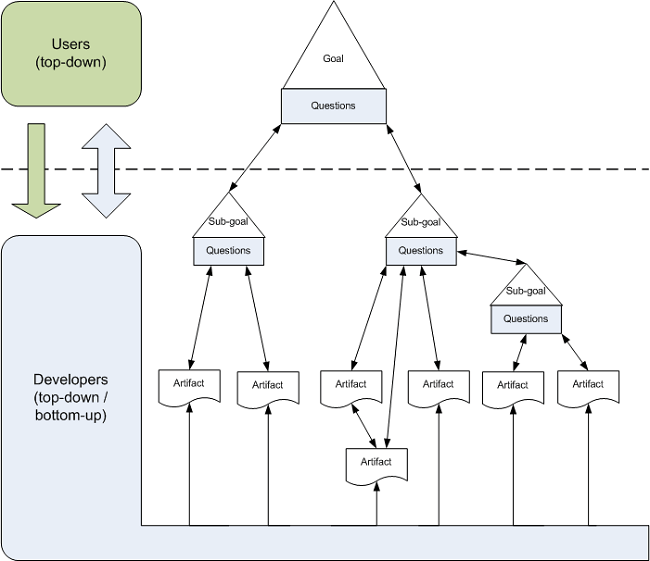
Goal-Driven Software Development
Image via Wikipedia
For example, size-based software metrics often measure lines of code to indicate coding complexity or software efficiency. In an effort to reduce the code’s complexity, management may place restrictions on how many lines of code are to written to complete functions. In an effort to simplify functions, software developers could write more functions that have fewer lines of code to reach their target but do not reduce overall code complexity or improve software efficiency.
When developing goals, management needs to involve the software development teams in establishing goals, choosing software metrics that measure progress toward those goals and align metrics with those goals.

2. Track trends, not numbers.

Software metrics are very seductive to management because complex processes are represented as simple numbers. And those numbers are easy to compare to other numbers. So when a software metric target is met, it is easy to declare success. Not reaching that number lets software development teams know they need to work more on reaching that target.
These simple targets do not offer as much information on how the software metrics are trending. Any single data point is not as significant as the trend it is part of. Analysis of why the trend line is moving in a certain direction or at what rate it is moving will say more about the process. Trends also will show what effect any process changes have on progress.
The psychological effects of observing a trend – similar to the Hawthorne Effect, or changes in behavior resulting from awareness of being observed – can be greater than focusing on a single measurement. If the target is not met, that, unfortunately, can be seen as a failure. But a trend line showing progress toward a target offers incentive and insight into how to reach that target.

3. Set shorter measurement periods.

Software development teams want to spend their time getting the work done not checking if they are reaching management established targets. So a hands-off approach might be to set the target sometime in the future and not bother the software team until it is time to tell them they succeeded or failed to reach the target.
By breaking the measurement periods into smaller time frames, the software development team can check the software metrics — and the trend line — to determine how well they are progressing.
Yes, that is an interruption, but giving software development teams more time to analyze their progress and change tactics when something is not working is very productive. The shorter periods of measurement offer more data points that can be useful in reaching goals, not just software metric targets.

4. Stop using software metrics that do not lead to change.

We all know that the process of repeating actions without change with the expectation of different results is the definition of insanity. But repeating the same work without adjustments that do not achieve goals is the definition of managing by metrics.
Why would software developers keep doing something that is not getting them closer to goals such as better software experiences? Because they are focusing on software metrics that do not measure progress toward that goal.
Some software metrics have no value when it comes to indicating software quality or team workflow. Management and software development teams need to work on software metrics that drive progress towards goals and provide verifiable, consistent indicators of progress.

Examples of Software Metrics

There is no standard or definition of software metrics that have value to software development teams. And software metrics have different value to different teams. It depends on what are the goals for the software development teams.
As a starting point, here are some software metrics that can help developers track their progress.

Agile process metrics

Agile process metrics focus on how agile teams make decisions and plan. These metrics do not describe the software, but they can be used to improve the software development process.

Lead time

Lead time quantifies how long it takes for ideas to be developed and delivered as software. Lowering lead time is a way to improve how responsive software developers are to customers.
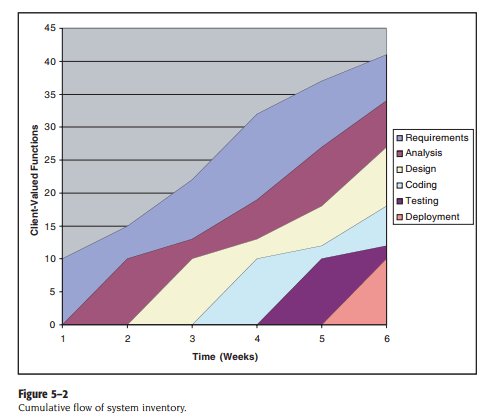
Cumulative flow of system inventory
Screenshot via Pearsoned.co.uk

Cycle time

Cycle time describes how long it takes to change the software system and implement that change in production.

Team velocity

Team velocity measures how many software units a team completes in an iteration or sprint. This is an internal metric that should not be used to compare software development teams. The definition of deliverables changes for individual software development teams over time and the definitions are different for different teams.

Open/close rates

Open/close rates are calculated by tracking production issues reported in a specific time period. It is important to pay attention to how this software metric trends.

Production

Production metrics attempt to measure how much work is done and determine the efficiency of software development teams. The software metrics that use speed as a factor are important to managers who want software delivered as fast as possible.

Active days

Active days is a measure of how much time a software developer contributes code to the software development project. This does not include planning and administrative tasks. The purpose of this software metric is to assess the hidden costs of interruptions.

Assignment scope

Assignment scope is the amount of code that a programmer can maintain and support in a year. This software metric can be used to plan how many people are needed to support a software system and compare teams.

Efficiency

Efficiency attempts to measure the amount of productive code contributed by a software developer. The amount of churn shows the lack of productive code. Thus a software developer with a low churn could have highly efficient code.

Code churn

Code churn represents the number of lines of code that were modified, added or deleted in a specified period of time. If code churn increases, then it could be a sign that the software development project needs attention.
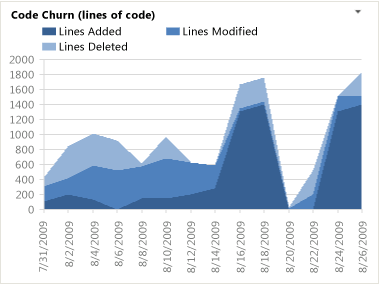
Code Churn Report - Visual Studio
Example Code Churn report, screenshot via Visual Studio

Impact

Impact measures the effect of any code change on the software development project. A code change that affects multiple files could have more impact than a code change affecting a single file.

Mean time between failures (MTBF) and mean time to recover/repair (MTTR)

Both metrics measure how the software performs in the production environment. Since software failures are almost unavoidable, these software metrics attempt to quantify how well the software recovers and preserves data.
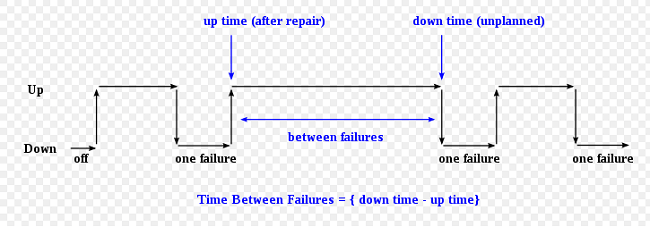
Time Between Failures Graph
Image via Wikimedia Commons

Application crash rate (ACR)

Application crash rate is calculated by dividing how many times an application fails (F) by how many times it is used (U).
ACR = F/U

Security metrics

Security metrics reflect a measure of software quality. These metrics need to be tracked over time to show how software development teams are developing security responses.

Endpoint incidents

Endpoint incidents are how many devices have been infected by a virus in a given period of time.

Mean time to repair (MTTR)

Mean time to repair in this context measures the time from the security breach discovery to when a working remedy is deployed.

Size-oriented metrics

Size-oriented metrics focus on the size of the software and are usually expressed as kilo lines of code (KLOC). It is a fairly easy software metric to collect once decisions are made about what constitutes a line of code. Unfortunately, it is not useful for comparing software projects written in different languages. Some examples include:
  • Errors per KLOC
  • Defects per KLOC
  • Cost per KLOC

Function-oriented metrics

Function-oriented metrics focus on how much functionality software offers. But functionality cannot be measured directly. So function-oriented software metrics rely on calculating the function point (FP) — a unit of measurement that quantifies the business functionality provided by the product. Function points are also useful for comparing software projects written in different languages.
Function points are not an easy concept to master and methods vary. This is why many software development managers and teams skip function points altogether. They do not perceive function points as worth the time.

Errors per FP or Defects per FP

These software metrics are used as indicators of an information system’s quality. Software development teams can use these software metrics to reduce miscommunications and introduce new control measures.

Defect Removal Efficiency (DRE)

The Defect Removal Efficiency is used to quantify how many defects were found by the end user after product delivery (D) in relation to the errors found before product delivery (E). The formula is:
DRE = E / (E+D)
The closer to 1 DRE is, the fewer defects found after product delivery.
With dozens of potential software metrics to track, it’s crucial for development teams to evaluate their needs and select metrics that are aligned with business goals, relevant to the project, and represent valid measures of progress. Monitoring the right metrics (as opposed to not monitoring metrics at all or monitoring metrics that don’t really matter) can mean the difference between a highly efficient, productive team and a floundering one. The same is true of software testing: using the right tests to evaluate the right features and functions is the key to success. (Check out our guide on software testing to learn more about the various testing types.)
While the process of defining goals, selecting metrics, and implementing consistent measurement methods can be time-consuming, the productivity gains and time saved over the life of a project make it time well invested. Various software metrics are incorporated into solutions such as application performance management (APM) tools, along with data and insights on application usage, code performance, slow requests, and much more. Retrace, Stackify’s APM solution, combines APM, logs, errors, monitoring, and metrics in one, providing a fully-integrated, multi-environment application performance solution to level-up your development work. Check out Stackify’s interview with John Sumser with HR Examiner, and one of Forbes Magazine’s 20 to Watch in Big Data, for more insights on DevOps and Big Data.

Friday, February 7, 2020

Software Engineering | Project Planning / submit by Ranjot Singh


Once a project is found to be possible, computer code project managers undertake project designing. Project designing is undertaken and completed even before any development activity starts. Project designing consists of subsequent essential activities:
Estimating the subsequent attributes of the project:
  • Project size:
    What’s going to be downside quality in terms of the trouble and time needed to develop the product?
  • Cost:
    What proportion is it reaching to value to develop the project?
  • Duration:
    However long is it reaching to want complete development?
  • Effort:
    What proportion effort would be required?
The effectiveness of the following designing activities relies on the accuracy of those estimations.

  • planning force and alternative resources
  • workers organization and staffing plans
  • Risk identification, analysis, and abatement designing
  • Miscellaneous arranges like quality assurance plan, configuration, management arrange, etc.
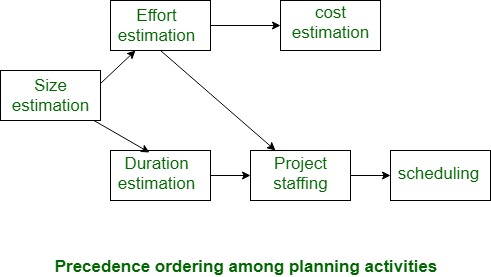
Precedence ordering among project planning activities:
The different project connected estimates done by a project manager have already been mentioned. The below diagram shows the order during which vital project coming up with activities is also undertaken. It may be simply discovered that size estimation is that the 1st activity. It’s conjointly the foremost basic parameter supported that all alternative coming up with activities square measure dispensed, alternative estimations like the estimation of effort, cost, resource, and project length also are vital elements of the project coming up with.


Sliding Window Planning:
Project designing needs utmost care and a spotlight since commitment to unrealistic time and resource estimates end in schedule slippage. Schedule delays will cause client discontent and adversely have an effect on team morale. It will even cause project failure.
However, project designing could be a terribly difficult activity. particularly for giant comes, it’s pretty much troublesome to create correct plans. A region of this issue is thanks to the actual fact that the correct parameters, the scope of the project, project workers, etc. might amendment throughout the span of the project. So as to beat this drawback, generally project managers undertake project designing little by little. Designing a project over a variety of stages protects managers from creating huge commitments too early. This method of staggered designing is thought of as window designing. Within the window technique, beginning with associate initial set up, the project is planned additional accurately in sequential development stages.
At the beginning of a project, project managers have incomplete information concerning the main points of the project. Their info base step by step improves because the project progresses through completely different phases. When the completion of each section, the project managers will set up every ulterior section additional accurately and with increasing levels of confidence.

Software Engineering | System configuration management BCA (Baba Jogi peer Campus Ralla)


Whenever a software is build, there is always scope for improvement and those improvements brings changes in picture. Changes may be required to modify or update any existing solution or to create a new solution for a problem. Requirements keeps on changing on daily basis and so we need to keep on upgrading our systems based on the current requirements and needs to meet desired outputs. Changes should be analyzed before they are made to the existing system, recorded before they are implemented, reported to have details of before and after, and controlled in a manner that will improve quality and reduce error. This is where the need of System Configuration Management comes.
System Configuration Management (SCM) is an arrangement of exercises which controls change by recognizing the items for change, setting up connections between those things, making/characterizing instruments for overseeing diverse variants, controlling the changes being executed in the current framework, inspecting and revealing/reporting on the changes made. It is essential to control the changes in light of the fact that if the changes are not checked legitimately then they may wind up undermining a well-run programming. In this way, SCM is a fundamental piece of all project management activities.
Processes involved in SCM –
Configuration management provides a disciplined environment for smooth control of work products. It involves the following activities:

  1. Identification and Establishment – Identifying the configuration items from products that compose baselines at given points in time (a baseline is a set of mutually consistent Configuration Items, which has been formally reviewed and agreed upon, and serves as the basis of further development). Establishing relationship among items, creating a mechanism to manage multiple level of control and procedure for change management system.
  2. Version control – Creating versions/specifications of the existing product to build new products from the help of SCM system. A description of version is given below:
    Suppose after some changes, the version of configuration object changes from 1.0 to 1.1. Minor corrections and changes result in versions 1.1.1 and 1.1.2, which is followed by a major update that is object 1.2. The development of object 1.0 continues through 1.3 and 1.4, but finally, a noteworthy change to the object results in a new evolutionary path, version 2.0. Both versions are currently supported.
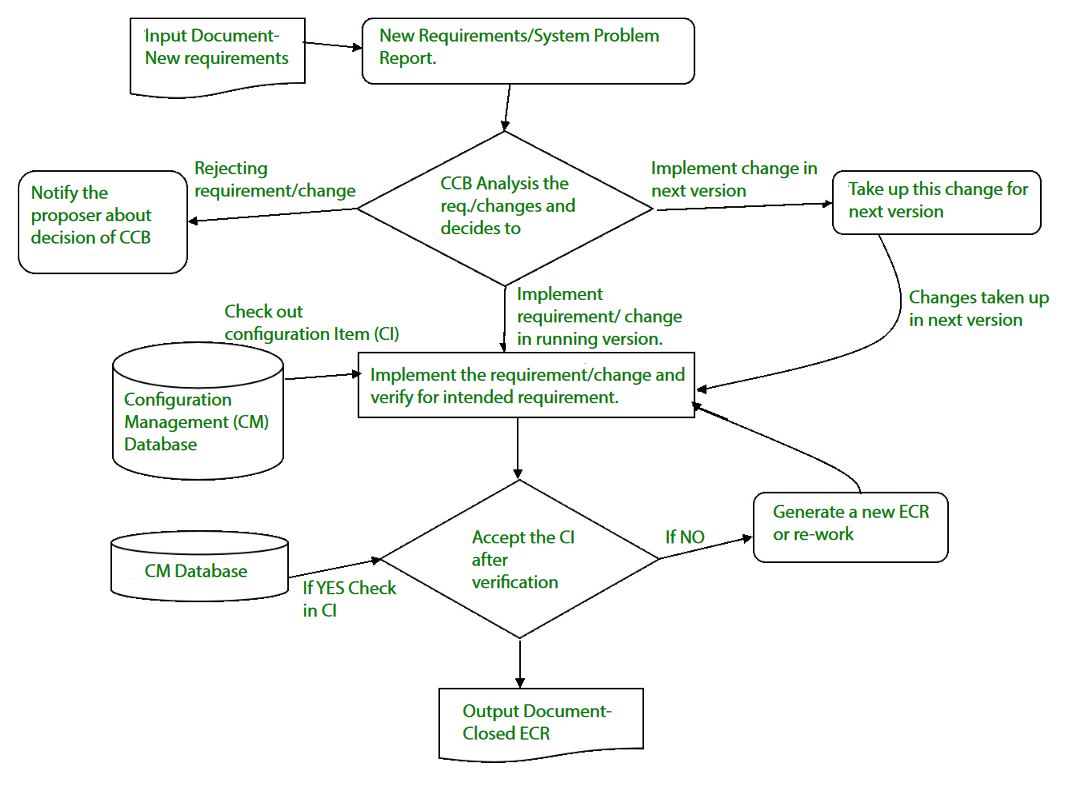
  3. Change control – Controlling changes to Configuration items (CI). The change control process is explained in Figure below:
    A change request (CR) is submitted and evaluated to assess technical merit, potential side effects, overall impact on other configuration objects and system functions, and the projected cost of the change. The results of the evaluation are presented as a change report, which is used by a change control board (CCB) —a person or group who makes a final decision on the status and priority of the change. An engineering change Request (ECR) is generated for each approved change.
    Also CCB notifies the developer in case the change is rejected with proper reason. The ECR describes the change to be made, the constraints that must be respected, and the criteria for review and audit. The object to be changed is “checked out” of the project database, the change is made, and then the object is tested again. The object is then “checked in” to the database and appropriate version control mechanisms are used to create the next version of the software.
  4. Configuration auditing – A software configuration audit complements the formal technical review of the process and product. It focuses on the technical correctness of the configuration object that has been modified. The audit confirms the completeness, correctness and consistency of items in the SCM system and track action items from the audit to closure.
  5. Reporting – Providing accurate status and current configuration data to developers, tester, end users, customers and stakeholders through admin guides, user guides, FAQs, Release notes, Memos, Installation Guide, Configuration guide etc .
  6. SCM Tools –
    Different tools are available in market for SCM like: CFEngine, Bcfg2 server, Vagrant, SmartFrog, CLEAR CASETOOL (CC), SaltStack, CLEAR QUEST TOOL, Puppet, SVN- Subversion, Perforce, TortoiseSVN, IBM Rational team concert, IBM Configuration management version management, Razor, Ansible, etc. There are many more in the list.
    It is recommended that before selecting any configuration management tool, have a proper understanding of the features and select the tool which best suits your project needs and be clear with the benefits and drawbacks of each before you choose one to use.

Software Engineering | Project Management Process


Project Management is the application of knowledge, skills, tools and techniques to project activities to meet the project requirements.
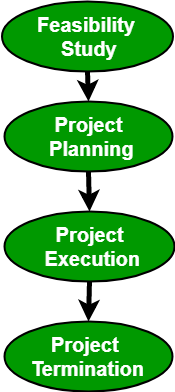
Project Management Process consists of the following 4 stages:
  • Feasibility study
  • Project Planning
  • Project Execution
  • Project Termination
Project Management Process


Feasibility Study:
Feasibility study explores system requirements to determine project feasibility. There are several fields of feasibility study including economic feasibility, operational feasibility, technical feasibility. The goal is to determine whether the system can be implemented or not. The process of feasibility study takes as input the requirement details as specified by the user and other domain-specific details. The output of this process simply tells whether the project should be undertaken or not and if yes, what would the constraints be. Additionally, all the risks and their potential effects on the projects are also evaluated before a decision to start the project is taken.
Project Planning:
A detailed plan stating stepwise strategy to achieve the listed objectives is an integral part of any project.
Planning consists of the following activities:
  • Set objectives or goals
  • Develop strategies
  • Develop project policies
  • Determine courses of action
  • Making planning decisions
  • Set procedures and rules for the project
  • Develop a software project plan
  • Prepare budget
  • Conduct risk management
  • Document software project plans
This step also involves the construction of a work breakdown structure(WBS). It also includes size, effort, schedule and cost estimation using various techniques.
Project Execution:
A project is executed by choosing an appropriate software development lifecycle model(SDLC). It includes a number of steps including requirements analysis, design, coding, testing and implementation, testing, delivery and maintenance. There are a number of factors that need to be considered while doing so including the size of the system, the nature of the project, time and budget constraints, domain requirements, etc. An inappropriate SDLC can lead to failure of the project.
Project Termination:
There can be several reasons for the termination of a project. Though expecting a project to terminate after successful completion is conventional, but at times, a project may also terminate without completion. Projects have to be closed down when the requirements are not fulfilled according to given time and cost constraints.
Some of the reasons for failure include:
  • Fast changing technology
  • Project running out of time
  • Organizational politics
  • Too much change in customer requirements
  • Project exceeding budget or funds
Once the project is terminated, a post-performance analysis is done. Also, a final report is published describing the experiences, lessons learned, recommendations for handling future projects.

Software Engineering | Software Characteristics for BCA PUNJABI University Patiala

Software Engineering | Software Characteristics

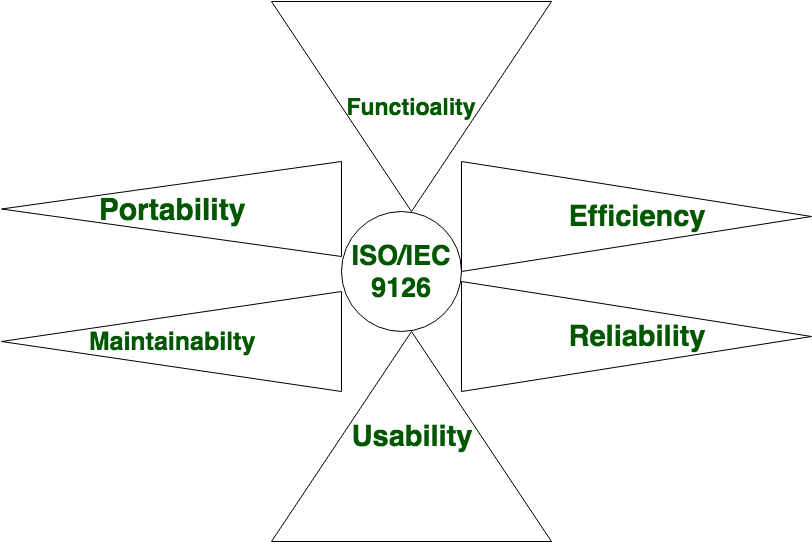
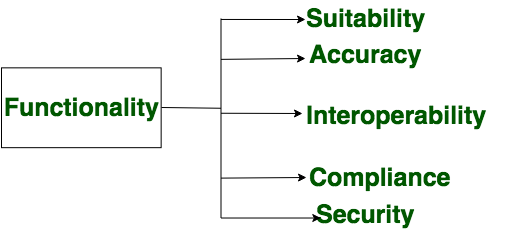
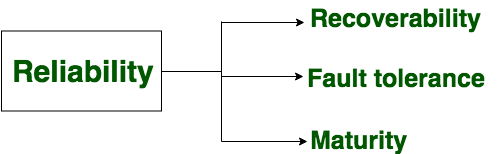
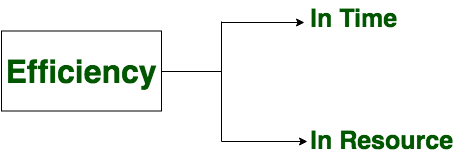
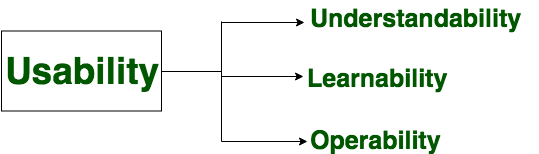
Software is defined as collection of computer programs, procedures, rules and data. Software Characteristics are classified into six major components:
These components are described below:

  • Functionality:
    It refers to the degree of performance of the software against its intended purpose.
    Required functions are:
  • Reliability:
    A set of attribute that bear on capability of software to maintain its level of performance under the given condition for a stated period of time.
    Required functions are:
  • Efficiency:
    It refers to the ability of the software to use system resources in the most effective and efficient manner.the software should make effective use of storage space and executive command as per desired timing requirement.
    Required functions are:
  • Usability:
    It refers to the extent to which the software can be used with ease.the amount of effort or time required to learn how to use the software.
    Required functions are:
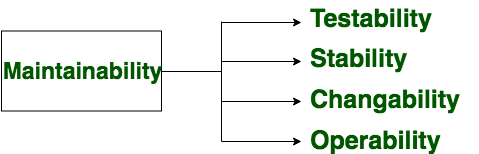
  • Maintainability:
    It refers to the ease with which the modifications can be made in a software system to extend its functionality, improve its performance, or correct errors.
    Required functions are:
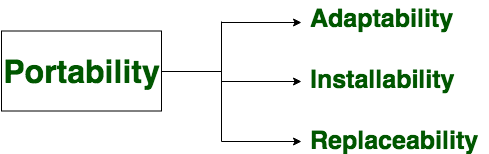
  • Portability:
    A set of attribute that bear on the ability of software to be transferred from one environment to another, without or minimum changes.
    Required functions are:

SDLC (Software Development Life Cycle) Phases, Methodologies, Process, And Models


SDLC is a process which defines the various stages involved in the development of software for delivering a high-quality product. SDLC stages cover the complete life cycle of a software i.e. from inception to retirement of the product.
Adhering to the SDLC process leads to the development of the software in a systematic and disciplined manner.
Purpose:
Purpose of SDLC is to deliver a high-quality product which is as per the customer’s requirement.
SDLC has defined its phases as, Requirement gathering, Designing, Coding, Testing, and Maintenance. It is important to adhere to the phases to provide the Product in a systematic manner.
For Example, A software has to be developed and a team is divided to work on a feature of the product and is allowed to work as they want. One of the developers decides to design first whereas the other decides to code first and the other on the documentation part.
This will lead to project failure because of which it is necessary to have a good knowledge and understanding among the team members to deliver an expected product.


SDLC Cycle

SDLC Cycle represents the process of developing software.
Below is the diagrammatic representation of the SDLC cycle:
SDLC Cycle

SDLC Phases

Given below are the various phases:
  • Requirement gathering and analysis
  • Design
  • Implementation or coding
  • Testing
  • Deployment
  • Maintenance

#1) Requirement Gathering and Analysis

During this phase, all the relevant information is collected from the customer to develop a product as per their expectation. Any ambiguities must be resolved in this phase only.
Business analyst and Project Manager set up a meeting with the customer to gather all the information like what the customer wants to build, who will be the end-user, what is the purpose of the product. Before building a product a core understanding or knowledge of the product is very important.
For Example, A customer wants to have an application which involves money transactions. In this case, the requirement has to be clear like what kind of transactions will be done, how it will be done, in which currency it will be done, etc.
Once the requirement gathering is done, an analysis is done to check the feasibility of the development of a product. In case of any ambiguity, a call is set up for further discussion.
Once the requirement is clearly understood, the SRS (Software Requirement Specification) document is created. This document should be thoroughly understood by the developers and also should be reviewed by the customer for future reference.

#2) Design

In this phase, the requirement gathered in the SRS document is used as an input and software architecture that is used for implementing system development is derived.

#3) Implementation or Coding

Implementation/Coding starts once the developer gets the Design document. The Software design is translated into source code. All the components of the software are implemented in this phase.

#4) Testing

Testing starts once the coding is complete and the modules are released for testing. In this phase, the developed software is tested thoroughly and any defects found are assigned to developers to get them fixed.
Retesting, regression testing is done until the point at which the software is as per the customer’s expectation. Testers refer SRS document to make sure that the software is as per the customer’s standard.

#5) Deployment

Once the product is tested, it is deployed in the production environment or first UAT (User Acceptance testing) is done depending on the customer expectation.
In the case of UAT, a replica of the production environment is created and the customer along with the developers does the testing. If the customer finds the application as expected, then sign off is provided by the customer to go live.

#6) Maintenance

After the deployment of a product on the production environment, maintenance of the product i.e. if any issue comes up and needs to be fixed or any enhancement is to be done is taken care by the developers.

Software Development Life Cycle Models

A software life cycle model is a descriptive representation of the software development cycle. SDLC models might have a different approach but the basic phases and activity remain the same for all the models.

#1) Waterfall Model

Waterfall model is the very first model that is used in SDLC. It is also known as the linear sequential model.
In this model, the outcome of one phase is the input for the next phase. Development of the next phase starts only when the previous phase is complete.
  • First, Requirement gathering and analysis is done. Once the requirement is freeze then only the System Design can start. Herein, the SRS document created is the output for the Requirement phase and it acts as an input for the System Design.
  • In System Design Software architecture and Design, documents which act as an input for the next phase are created i.e. Implementation and coding.
  • In the Implementation phase, coding is done and the software developed is the input for the next phase i.e. testing.
  • In the testing phase, the developed code is tested thoroughly to detect the defects in the software. Defects are logged into the defect tracking tool and are retested once fixed. Bug logging, Retest, Regression testing goes on until the time the software is in go-live state.
  • In the Deployment phase, the developed code is moved into production after the sign off is given by the customer.
  • Any issues in the production environment are resolved by the developers which come under maintenance.
Waterfall Model
Advantages of the Waterfall Model:
  • Waterfall model is the simple model which can be easily understood and is the one in which all the phases are done step by step.
  • Deliverables of each phase are well defined, and this leads to no complexity and makes the project easily manageable.
Disadvantages of Waterfall model:
  • Waterfall model is time-consuming & cannot be used in the short duration projects as in this model a new phase cannot be started until the ongoing phase is completed.
  • Waterfall model cannot be used for the projects which have uncertain requirement or wherein the requirement keeps on changing as this model expects the requirement to be clear in the requirement gathering and analysis phase itself and any change in the later stages would lead to cost higher as the changes would be required in all the phases.

#2) V-Shaped Model

V- Model is also known as Verification and Validation Model. In this model Verification & Validation goes hand in hand i.e. development and testing goes parallel. V model and waterfall model are the same except that the test planning and testing start at an early stage in V-Model.
V-Shaped Model
a) Verification Phase:
(i) Requirement Analysis:
In this phase, all the required information is gathered & analyzed. Verification activities include reviewing the requirements.
(ii) System Design:
Once the requirement is clear, a system is designed i.e. architecture, components of the product are created and documented in a design document.
(iii) High-Level Design:
High-level design defines the architecture/design of modules. It defines the functionality between the two modules.
(iv) Low-Level Design:
Low-level Design defines the architecture/design of individual components.
(v) Coding:
Code development is done in this phase.
b) Validation Phase:
(i) Unit Testing:
Unit testing is performed using the unit test cases that are designed and is done in the Low-level design phase. Unit testing is performed by the developer itself. It is performed on individual components which lead to early defect detection.
(ii) Integration Testing:
Integration testing is performed using integration test cases in High-level Design phase. Integration testing is the testing that is done on integrated modules. It is performed by testers.
(iii) System Testing:
System testing is performed in the System Design phase. In this phase, the complete system is tested i.e. the entire system functionality is tested.
(iv) Acceptance Testing:
Acceptance testing is associated with the Requirement Analysis phase and is done in the customer’s environment.
Advantages of V – Model:
  • It is a simple and easily understandable model.
  • V –model approach is good for smaller projects wherein the requirement is defined and it freezes in the early stage.
  • It is a systematic and disciplined model which results in a high-quality product.
Disadvantages of V-Model:
  • V-shaped model is not good for ongoing projects.
  • Requirement change at the later stage would cost too high.

#3) Prototype Model

The prototype model is a model in which the prototype is developed prior to the actual software.
Prototype models have limited functional capabilities and inefficient performance when compared to the actual software. Dummy functions are used to create prototypes. This is a valuable mechanism for understanding the customers’ needs.
Software prototypes are built prior to the actual software to get valuable feedback from the customer. Feedbacks are implemented and the prototype is again reviewed by the customer for any change. This process goes on until the model is accepted by the customer.
Prototype Model
Once the requirement gathering is done, the quick design is created and the prototype which is presented to the customer for evaluation is built.
Customer feedback and the refined requirement is used to modify the prototype and is again presented to the customer for evaluation. Once the customer approves the prototype, it is used as a requirement for building the actual software. The actual software is build using the Waterfall model approach.
Advantages of Prototype Model:
  • Prototype model reduces the cost and time of development as the defects are found much earlier.
  • Missing feature or functionality or a change in requirement can be identified in the evaluation phase and can be implemented in the refined prototype.
  • Involvement of a customer from the initial stage reduces any confusion in the requirement or understanding of any functionality.
Disadvantages of Prototype Model:
  • Since the customer is involved in every phase, the customer can change the requirement of the end product which increases the complexity of the scope and may increase the delivery time of the product.

#4) Spiral Model

The Spiral Model includes iterative and prototype approach.
Spiral model phases are followed in the iterations. The loops in the model represent the phase of the SDLC process i.e. the innermost loop is of requirement gathering & analysis which follows the Planning, Risk analysis, development, and evaluation. Next loop is Designing followed by Implementation & then testing.
Spiral Model has four phases:
  • Planning
  • Risk Analysis
  • Engineering
  • Evaluation
Spiral Model
(i) Planning:
The planning phase includes requirement gathering wherein all the required information is gathered from the customer and is documented. Software requirement specification document is created for the next phase.
(ii) Risk Analysis:
In this phase, the best solution is selected for the risks involved and analysis is done by building the prototype.
For Example, the risk involved in accessing the data from a remote database can be that the data access rate might be too slow. The risk can be resolved by building a prototype of the data access subsystem.
(iii) Engineering:
Once the risk analysis is done, coding and testing are done.
(iv) Evaluation:
Customer evaluates the developed system and plans for the next iteration.
Advantages of Spiral Model:
  • Risk Analysis is done extensively using the prototype models.
  • Any enhancement or change in the functionality can be done in the next iteration.
Disadvantages of Spiral Model:
  • The spiral model is best suited for large projects only.
  • The cost can be high as it might take a large number of iterations which can lead to high time to reach the final product.

#5) Iterative Incremental Model 

The iterative incremental model divides the product into small chunks.
For Example, Feature to be developed in the iteration is decided and implemented. Each iteration goes through the phases namely Requirement Analysis, Designing, Coding, and Testing. Detailed planning is not required in iterations.
Once the iteration is completed, a product is verified and is delivered to the customer for their evaluation and feedback. Customer’s feedback is implemented in the next iteration along with the newly added feature.
Hence, the product increments in terms of features and once the iterations are completed the final build holds all the features of the product.
Phases of Iterative & Incremental Development Model:
  • Inception phase
  • Elaboration Phase
  • Construction Phase
  • Transition Phase
(i) Inception Phase:
Inception phase includes the requirement and scope of the Project.
(ii) Elaboration Phase:
In the elaboration phase, the working architecture of a product is delivered which covers the risk identified in the inception phase and also fulfills the non-functional requirements.
(iii) Construction Phase:
In the Construction phase, the architecture is filled in with the code which is ready to be deployed and is created through analysis, designing, implementation, and testing of the functional requirement.
(iv) Transition Phase:
In the Transition Phase, the product is deployed in the Production environment.
Advantages of Iterative & Incremental Model:
  • Any change in the requirement can be easily done and would not cost as there is a scope of incorporating the new requirement in the next iteration.
  • Risk is analyzed & identified in the iterations.
  • Defects are detected at an early stage.
  • As the product is divided into smaller chunks it is easy to manage the product.
Disadvantages of Iterative & Incremental Model:
  • Complete requirement and understanding of a product are required to break down and build incrementally.

#6) Big Bang Model

Big Bang Model does not have any defined process. Money and efforts are put together as the input and output come as a developed product which might be or might not be the same as what the customer needs.
Big Bang Model does not require much planning and scheduling. The developer does the requirement analysis & coding and develops the product as per his understanding. This model is used for small projects only. There is no testing team and no formal testing is done, and this could be a cause for the failure of the project.
Advantages of Big Bang Model:
  • It’s a very simple Model.
  • Less Planning and scheduling is required.
  • The developer has the flexibility to build the software of their own.
Disadvantages of the Big Bang Model:
  • Big Bang models cannot be used for large, ongoing & complex projects.
  • High risk and uncertainty.

#7) Agile Model

Agile Model is a combination of the Iterative and incremental model. This model focuses more on flexibility while developing a product rather than on the requirement.
In Agile, a product is broken into small incremental builds. It is not developed as a complete product in one go. Each build increments in terms of features. The next build is built on previous functionality.
In agile iterations are termed as sprints. Each sprint lasts for2-4 weeks. At the end of each sprint, the product owner verifies the product and after his approval, it is delivered to the customer.
Customer feedback is taken for improvement and his suggestions and enhancement are worked on in the next sprint. Testing is done in each sprint to minimize the risk of any failures.
Agile Model
Advantages of Agile Model:
  • It allows more flexibility to adapt to the changes.
  • The new feature can be added easily.
  • Customer satisfaction as the feedback and suggestions are taken at every stage.
Disadvantages:
  • Lack of documentation.
  • Agile needs experienced and highly skilled resources.
  • If a customer is not clear about how exactly they want the product to be, then the project would fail.

Conclusion

Adherence to a suitable life cycle is very important, for the successful completion of the Project. This, in turn, makes the management easier.
Different Software Development Life Cycle models have their own Pros and Cons. The best model for any Project can be determined by the factors like Requirement (whether it is clear or unclear), System Complexity, Size of the Project, Cost, Skill limitation, etc.
Examplein case of an unclear requirement, Spiral and Agile models are best to be used as the required change can be accommodated easily at any stage.
Waterfall model is a basic model and all the other SDLC models are based on that only.